MFA Testing Guide: How to Design Secure Multi-Factor Authentication Test Cases

Before you answer that, let’s take a simple scenario: you enter a password, receive an OTP via SMS or authenticator app, complete verification, and gain access.
That confirms the happy path works, but it says nothing about how your multi-factor authentication holds up against invalid inputs, expired tokens, brute-force attempts, MFA bypass techniques, and session edge cases. These are the exact conditions where authentication failures occur in production.
Testing MFA security means going beyond the happy path. Whether you’re a QA engineer validating authentication flows or a security tester probing for vulnerabilities, structured MFA testing is how you confirm that access control works exactly as designed, not just under ideal conditions, but under the ones that actually matter.
In this guide, you’ll learn what that is, why it’s important, which MFA test scenarios to cover, and how to create test cases that corroborate multi-factor authentication flows effectively.
What Is MFA Testing?
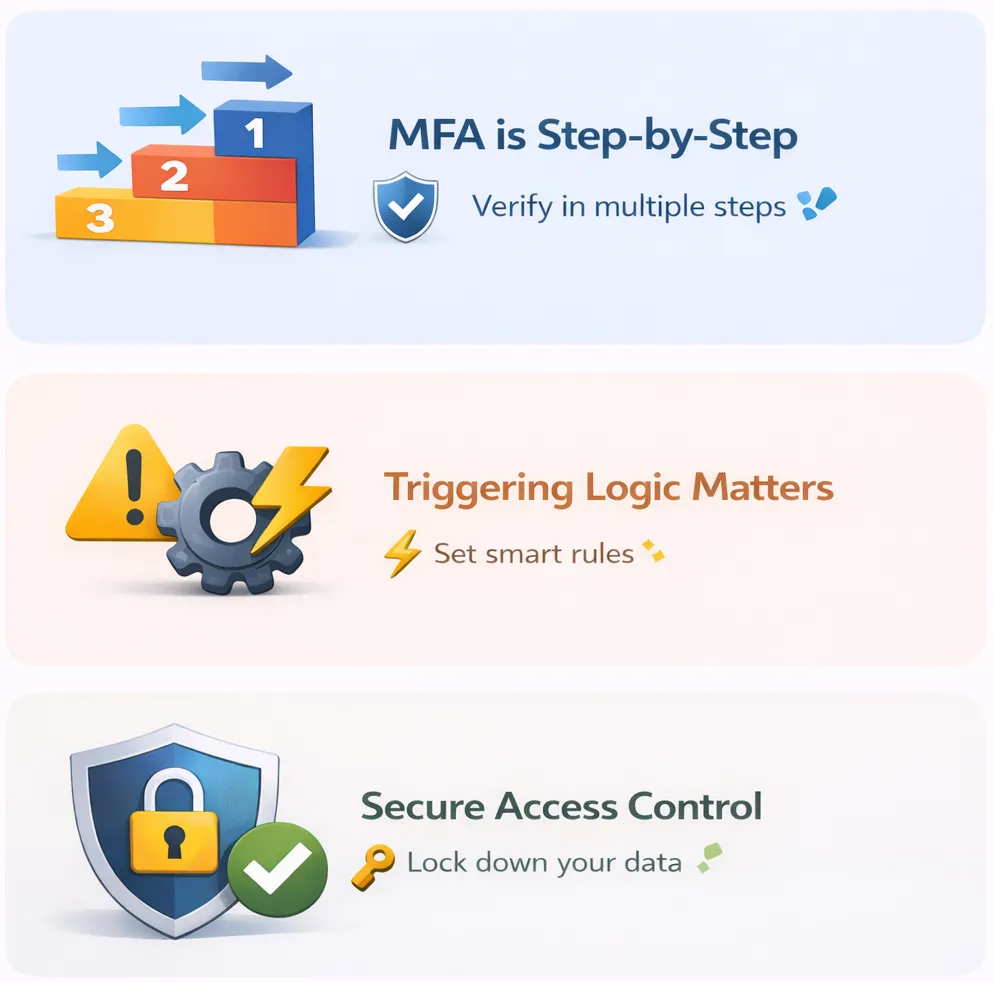
MFA Testing is the process of verifying that your application enforces a required sequence of multiple verification steps before granting access to an application.
It confirms that each factor is triggered at the correct stage, that valid factors such as OTPs, authenticator codes, and biometrics are accepted, and that invalid, expired, missing, or reused factors result in denied application access.
Why Multi-Factor Authentication Testing Is Critical
Let’s understand why MFA tests are important to perform:
1. Ensures consistent enforcement across devices and sessions: Authentication behavior can change across browsers, devices, and session states. Trusted devices may minimize MFA prompts, while new devices must trigger verification. MFA testing verifies that the same enforcement rules apply whether the user is signing in from a new browser, an expired session, or a different environment.
2. Prevents account takeover using stolen credentials: Passwords are routinely exposed through phishing, credential reuse, and data breaches. MFA exists to stop attackers from accessing accounts even when they have the correct information for login purposes.
3. Detects MFA bypass and authentication logic flaws: Authentication systems depend on strict policy enforcement at every step of the login process. For instance, if device risk, IP reputation, role, or action sensitivity aren’t evaluated correctly, MFA may not trigger when required.
That means attackers with valid credentials can access accounts without completing additional verification. MFA testing validates that the second factor can’t be bypassed during login, recovery flows, or direct navigation to protected assets.
4. Validates OTP and identity provider integrations: Many MFA implementations depend on external systems, such as OTP delivery services, authenticator apps, or identity providers. Failures in these integrations can prevent authentication or allow incorrect invalidation.
MFA tests ensure that tokens are generated correctly, expire as configured, cannot be reused, and are rejected when tampered with or delayed.
5. Protects sensitive actions and privileged access: Applications often require MFA for high-risk actions, like payment approvals, password changes, and admin access. MFA testing ensures that these actions always trigger factor verification and deny execution when authentication requirements aren’t satisfied.
MFA Testing vs Single Factor Authentication
Unlike MFA, single factor authentication relies on only one credential, typically a password. The table below highlights the difference in testing scope:
| Area | Single Factor Authentication Testing | MFA Testing |
|---|---|---|
| Authentication requirement | You verify password validation only | You verify password validation plus additional factors, such as OTP, authenticator approval, or biometrics |
| Access control enforcement | Access is granted immediately after password validation | Access is granted only after all required authentication factors are successfully verified |
| Failure handling | You test incorrect password rejection and account lockout | You test invalid OTP rejection, expired OTP handling, retry limits, lockouts, and missing factor scenarios |
| Authentication flow complexity | You validate a single-step login flow | You validate multi-step authentication flows with defined states and transitions |
| Session creation | Session is created after password verification | Session token must not be issued until all required factors are successfully verified |
| Bypass risk testing | Limited bypass scenarios | You must test bypass attempts, like skipping OTP steps, session reuse, and direct access to protected resources |
| External dependency testing | Usually, no external dependencies | You must validate OTP delivery systems, authenticator apps, and identity provider integrations |
| Device and context validation | Authentication behavior is generally consistent | Authentication requirements may change based on device, session state, location, or risk signals |
Types of MFA Test Scenarios
In the case of MFA, test scenarios are based on the kind of authentication factor used during verification.
Let’s have a look at the top five types of MFA test scenarios:
1. Knowledge Factor Test Scenarios
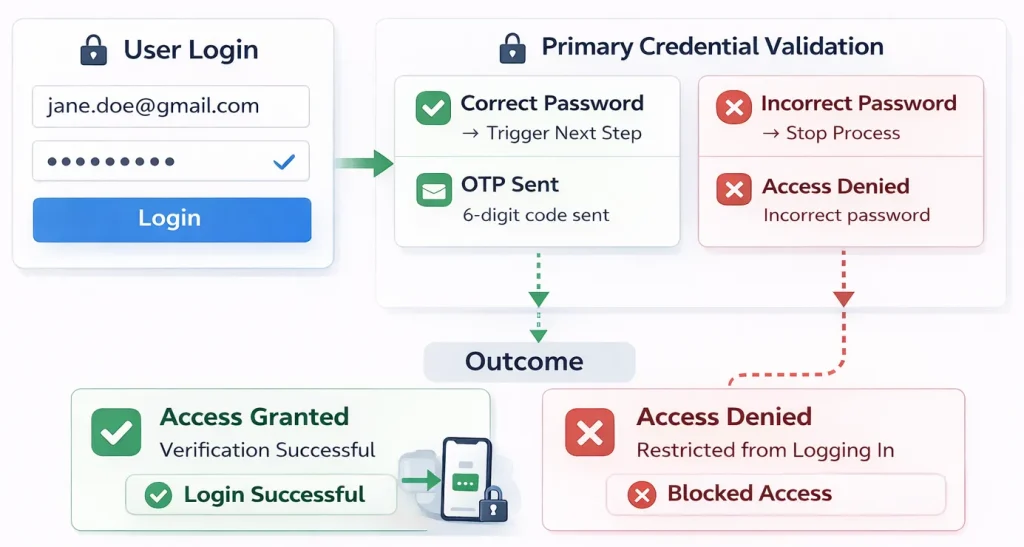
These scenarios begin when you submit a primary credential, such as a password or PIN, to establish your identity and determine whether it’s fine to proceed to the next verification stage.
So, if the password is correct, the application sends an OTP or prompts for taking biometrics. If it’s incorrect, access is denied, and no additional verification step is initiated.
2. Possession Factor Test Scenarios
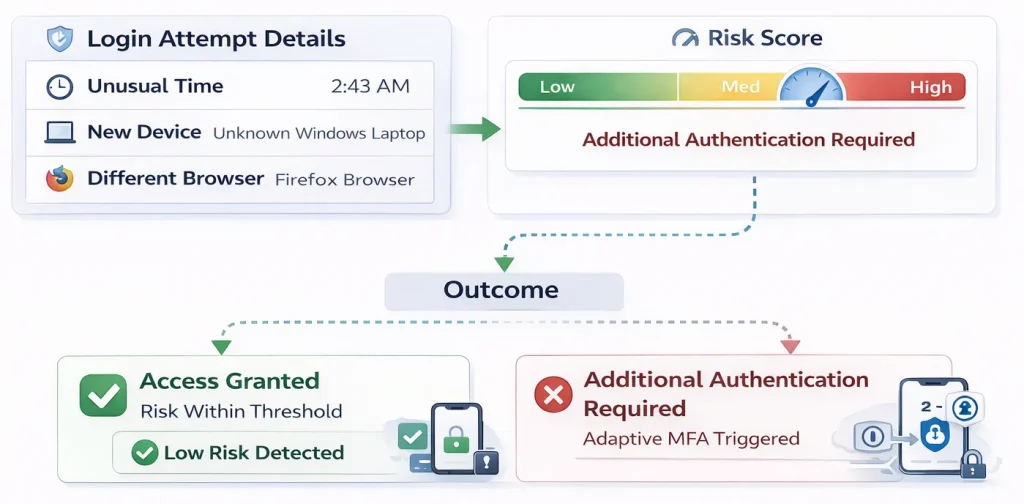
These scenarios occur when the application verifies something you own, such as a registered mobile device, email account, or authenticator tool.
For instance, after you successfully submit your credentials, the application generates a time-sensitive OTP or sends an authentication request to your registered device.
You should test that expired codes are rejected, previously used codes cannot be replayed, and retry limits trigger lockout or cooldown policies as configured. The application may allow retry attempts based on the configured limits.
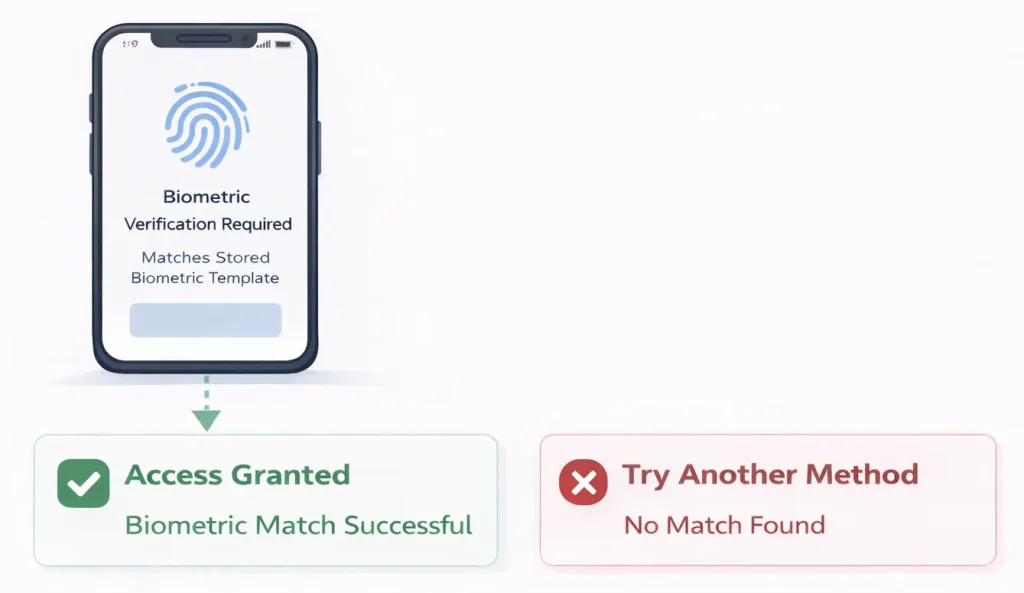
3. Inherence Factor Test Scenarios
These scenarios rely on biometric verification, such as fingerprint or facial recognition, to confirm your identity and mostly occur on supported mobile devices and operating systems.
When you attempt to access an application, it prompts you to authenticate using a biometric factor. If your input matches the stored references, access is granted to you. If not, you’re either denied access or compelled to complete authentication using another factor.
4. Behavior Factor Test Scenarios
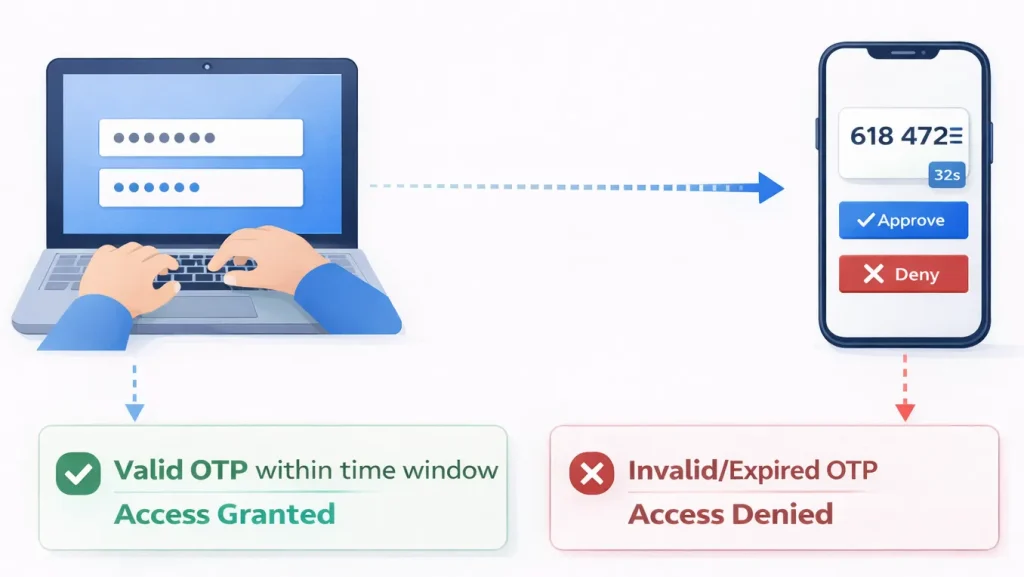
These scenarios are triggered when your login behavior differs from established patterns. That could include unusual device usage, login timings, and access patterns.
For instance, if you log in from a device or environment that the application doesn’t recognize, additional authentication is required before you can access it. In many apps, these signals initiate step-up MFA rather than serving as standalone authentication factors.
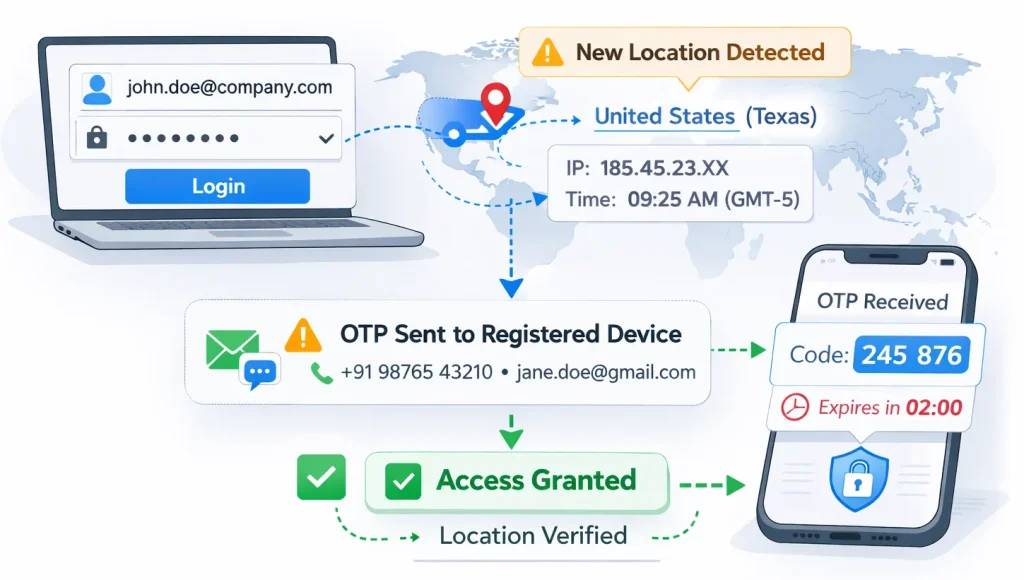
5. Location Factor Test Scenarios
These scenarios pop up when your authentication context changes based on network, IP address, or geographic location. The application evaluates your access environment and determines whether additional verification is required.
If you’re trying to access the app from a new location, it will detect the change and prompt you to enter an OTP to your registered device or provide other predefined authentication details to confirm your identity.
Multi Factor Authentication Examples (Use Cases)
Here are practical examples that show when and how MFA is triggered in real-world applications:
1. User login: Everyone knows that a login protects the primary access point. As we’ve learned in the previous section, MFA reduces the impact of compromised passwords and credential stuffing attacks.
2. Password reset: Account recovery is a common bypass target. MFA ensures that password changes require proof of identity beyond knowledge of the username or email.
3. Financial transactions: High-risk actions such as fund transfers or payment updates require step-up verification – we’ve all experienced such situations. Such an authorization level protects active sessions from password misuse or account takeover in financial apps.
4. Administrative access: Privileged operations expose system configuration and user data. MFA limits the blast radius if an admin password is compromised.
5. New device enrollment: When you register a new device on an application, MFA verifies identity before adding it to the trusted device list. This prevents attackers from silently attaching their own device to your account.
6. API or token generation: When you generate API keys, access tokens, or integration credentials, MFA adds protection to prevent unauthorized systems from accessing long-lived credentials.
7. Changes to role, permission, or contact details: Modifying user roles, permissions, email addresses, or phone numbers can increase privilege exposure or alter future authentication channels. MFA re-verifies identity before applying these changes to prevent unauthorized escalation or recovery hijacking.
How to Design MFA Test Cases (+ MFA Testing Best Practices)
Here’s how to write test cases for MFA that cover validation, rejection, and edge conditions while following multi factor authentication best practices.
1. Identify where MFA is enforced: This step defines the scope of your MFA test coverage. So, make a simple list of actions that are supposed to require MFA user login, password reset, new device or browser login, admin access, and so on.
For each one, document:
- What action triggers MFA
- Which factor is required
- What must happen before access is granted
Then execute each action.
| Best practice: To make this process easier, draw a simple table with three columns: Action, MFA Triggered (Yes/No), and Factor Type. Once you execute each action, cleanly record whether MFA appears. For example, if login from a new device triggers OTP but password reset doesn’t, you’ve identified a critical authentication gap. |
2. Map authentication flows, factor paths, and expected outcomes: Next, break the authentication process into individual steps. Every MFA test case follows a sequence of state transitions.
A typical MFA flow looks like this:
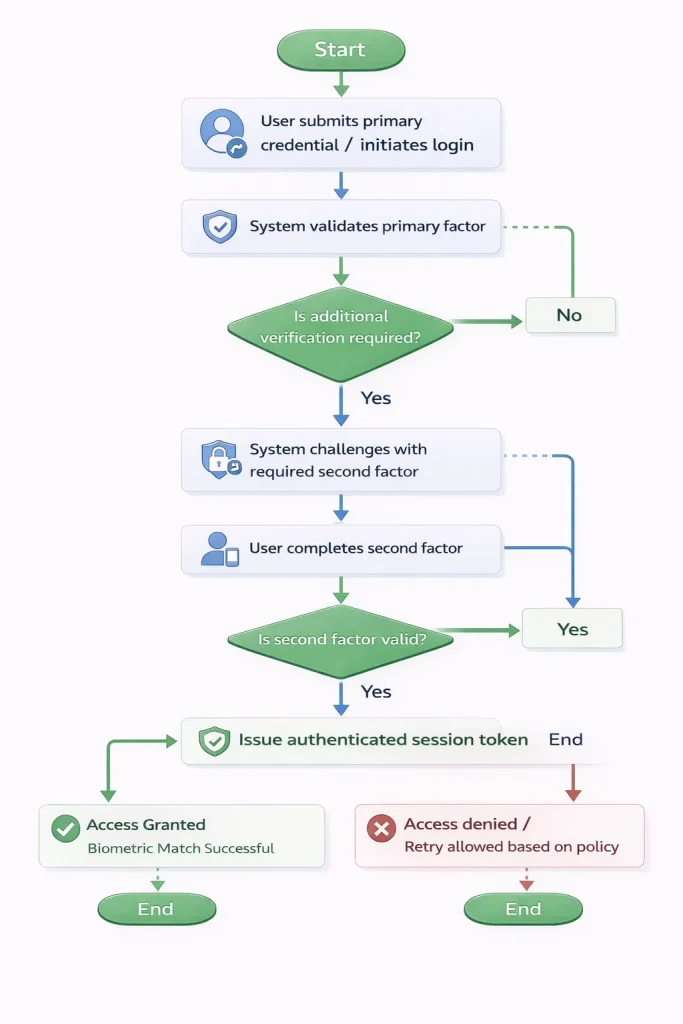
Write down all common states, including user submitting credentials, system validating credentials, system challenging with a second factor, and so on. Verify exactly where the session token is created.
| Best practice: Capture the exact backend request where the session token is issued. Verify that the token is created only after all required factors are successfully validated. Use your browser dev tools or API logs. For instance, if a session token is issued before the second factor is verified, after a failed factor attempt, or during direct navigation to a protected resource, you’ve identified an authentication bypass risk. This method ensures your MFA testing validates server-side enforcement and state transitions, not just UI behavior. |
3. Define expected behavior for each step: Every authentication factor operates within defined validation rules, which include retry limits, lockout thresholds, OTP validity duration, session expiration, and trusted device behavior. Your job is to verify them all.
Therefore, check for things like:
- Lockout thresholds
- OTP expiration time
- Trusted device behavior
- Maximum retry attempts
- Session expiration timing
More importantly, don’t assume expiration windows or retry limits are enforced as documented. Validate them through controlled testing.
For instance, if the factor uses time-based validity, execute the following steps:
- Trigger the generation of the factor
- Record the exact timestamp of generation
- Submit the factor at defined intervals, for example:
- 10 seconds before expected expiration
- At the exact configured expiration time
- 10 seconds after expiration
| Best practice: Log the server response for each attempt. Confirm that: Verification succeeds before expiration. Verification fails at or after expiration. No session token is issued after expiration. If the application continues to accept the factor beyond the configured validity window, the enforcement threshold is misconfigured. |
4. Create positive and negative MFA test cases: This is important to do for every enforcement rule.
Positive test cases confirm that authentication succeeds when valid inputs are provided. On the other hand, negative test cases confirm that authentication fails when enforcement rules are violated. To create these test cases, you should define:
- Identify each authentication state in the flow
- Define the expected application behavior for success and failure at each state
- Specify what must happen at the backend, not just the UI
Here’s how a basic MFA test case looks in both scenarios:
| Area | Positive Test Case | Negative Test Case |
|---|---|---|
| Primary credential | Submit valid credentials. Expect a second factor challenge. | Submit invalid credentials. Expect authentication to stop. |
| Second factor | Submit the required valid factors. Expect session token issuance. | Submit invalid, expired, or reused factors. Expect authentication failure and no session token. |
| Enforcement | Complete all required steps. Expect access to protected resources. | Attempt to skip required steps or access protected resources early. Expect access denied. |
| Best practice: Each row represents a policy rule, which must be validated in both directions. – Rule: Maximum five failed second-factor attempts before lockout. – Positive case: Complete authentication within five attempts. Expect a successful login. – Negative case: Submit six invalid attempts. Expect a lockout or cooldown according to policy. If you only test the success case, you confirm functionality. If you test both, you confirm enforcement. |
Automate and Strengthen MFA Testing With TestGrid
If you’ve read this far, you now have a complete understanding of how MFA testing works, what can go wrong, and how to design test cases that validate authentication flows correctly. The next step here is execution.
You need an end-to-end testing platform that can run these MFA tests reliably on different devices, environments, and real authentication conditions.
This is where TestGrid enters the picture. The platform enables you to execute web and mobile tests on real browsers and real devices without maintaining your own infrastructure.
You can:
- Run OTP, push-notification, and biometric flows on real Android and iOS devices
- Validate session enforcement and token expiration across browsers
- Test rate limiting, retry thresholds, and lockout policies
- Execute authentication tests inside secure staging environments using TG Tunnel
When you run your MFA test on TestGrid, you can observe how authentication behaves across Chrome, Safari, Edge, Android, and iOS, and confirm that factor verification and session enforcement work consistently.
Plus, you can run the same tests using multiple configurations from a single platform. This ensures your multi factor authentication design and overall application behavior remain consistent regardless of where and how users access your application.
TestGrid integrates authentication regression directly with your CI/CD pipeline, allowing you to run automated tests as part of your build and release process.
With device-level control and enterprise-grade environment isolation, MFA validation becomes repeatable, traceable, and policy-aligned. If you’d like to gain complete visibility and control over your MFA testing efforts
This blog is originally published at TestGrid


Comments
Post a Comment